What to include in a SpringHillMedGroup contact message: begin with who you are, your preferred contact, and the single action you want taken. This article narrows SpringHillMedGroup contact guidance for editorial matters to the wording and supporting details of a single enquiry. It focuses on concise facts, exact identifiers, and the choice between portal, email, or phone. Readers will get ready-to-send templates, clear priorities that speed triage, and honest warnings about common mistakes that slow responses.
Key Takeaways
- A SpringHillMedGroup contact message should start with your full name, date of birth, and a single clear request to speed staff response.
- Include your preferred contact method (phone or email) with exact details to avoid delays and ensure timely communication.
- State the urgency of your request upfront as ‘Urgent – call me’ or ‘Routine – portal/email ok’ to help prioritize your message.
- Provide exact identifiers like patient/portal ID, provider name, dates, medication details, and insurance information to minimize back-and-forth and accelerate resolution.
- Use secure patient portals or designated forms for sensitive medical information to maintain privacy and reduce transcription errors.
- Offering two to three specific appointment windows increases the chance of quicker scheduling without additional follow-up.
Essential Elements To Include In Your SpringHillMedGroup Contact Message
Start with this fact: include identity, contact, and the exact request in the first sentence. That single change cuts back-and-forth and speeds resolution.
Why it matters: SpringHillMedGroup staff rely on exact identifiers to find records and route work to the right team. Without full name, date of birth, or a patient/portal ID, staff may delay your case while they verify you. Include these items in every message:
- Full name (as on file) and date of birth. These are primary keys for the record system.
- Best contact information: one phone number and one email. Mark which is preferred.
- The main reason for contact in one line (appointment, refill, billing, records request, portal issue). Put urgency (urgent/routine) right after that line.
- Relevant details: provider name, visit date, symptom start date, medication dose, invoice number, or portal ID. Exact dates and numbers avoid follow-up.
- Preferred times/dates when asking to schedule or reschedule. Offer two to three windows.
- Insurance plan name and member ID when the question touches billing or coverage.
- Patient ID or portal username if available. This saves multiple verification steps.
Practical warning: never include sensitive full clinical narratives in an unsecured email. For medical details, use the secure patient portal or the designated contact form on the site. For example, the site’s contact guidance explains how to connect for routine issues and when to call directly: the spring hillmedgroup contact guide.
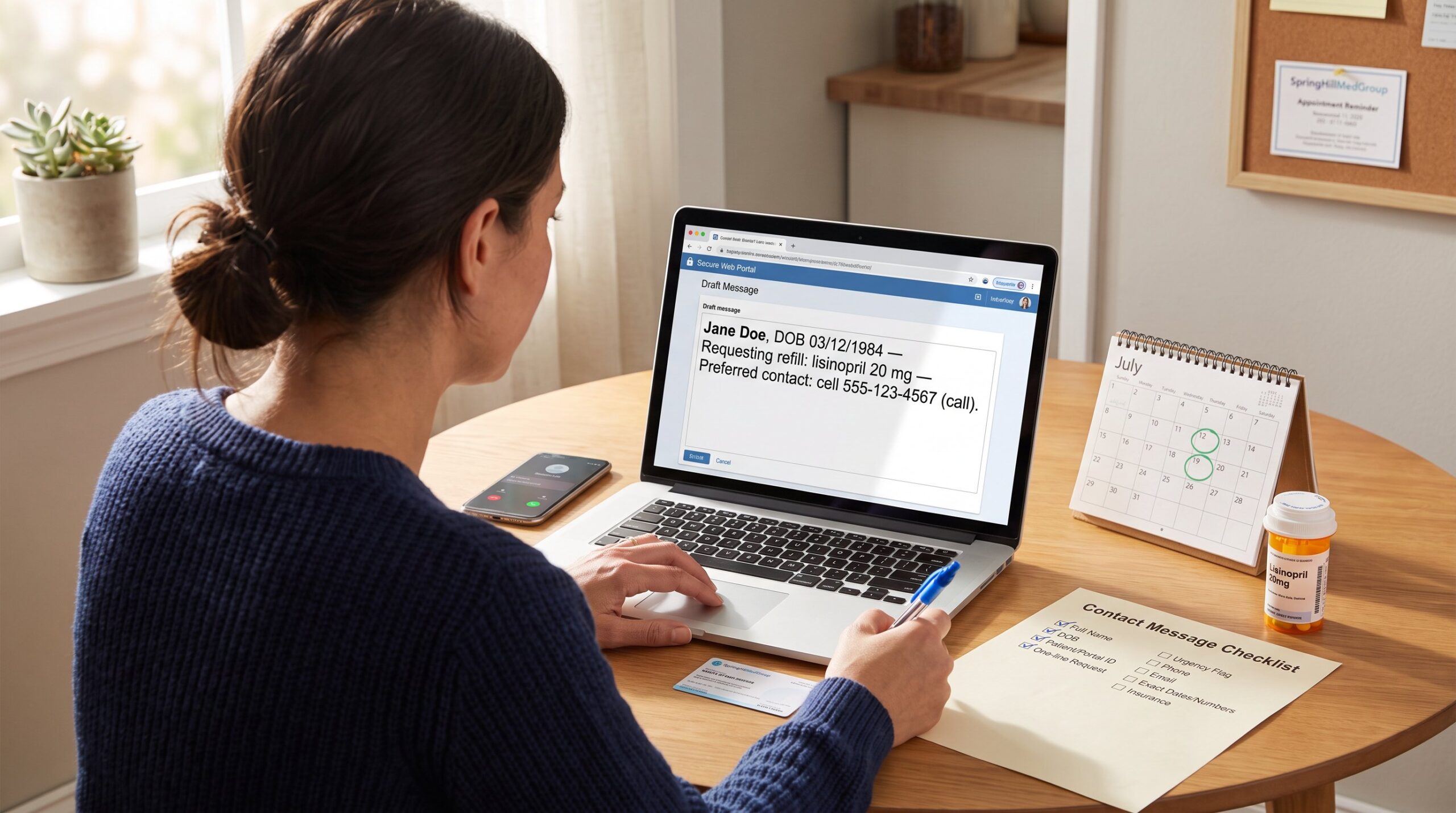
Concrete example of the opening sentence that works: “Jane Doe, DOB 03/12/1984, requests a refill for lisinopril 20 mg: preferred contact: cell 555-123-4567 (call).” That line tells staff who, what, and how to respond in one pass.
Related resource: for direct phone reach if a call is faster, SpringHillMedGroup lists main numbers and routing options on their phone number guide.
What To Prioritize For A Clear, Faster Response
Putting the request first makes the message easier to understand, but why SpringHillMedGroup may not respond to a website enquiry depends on more than message clarity. This reduces ticket loops and speeds clinician review.
Specific priorities to follow:
- First sentence: the action you want (schedule, reschedule, refill, billing explanation, record amendment). Example: “Requesting to reschedule my 7/12 cardiology visit to the week of 7/25.”
- Urgency flag: write either “Urgent – call me” or “Routine – portal/email ok.” Staff routes urgent flags differently.
- All required data: dates, medication name and dose, invoice number, provider name, insurance plan, and patient ID. If staff must ask for one more item, it delays you by days.
- Clear availability: list two to three specific appointment windows rather than vague times. That increases the chance of same-week scheduling.
- Use the secure portal for health details. The portal reduces transcription errors and preserves privacy.
Honest lesson learned: a patient who wrote “call me” without a number waited three days. The fix: always include the preferred phone number and email in the first block. Another real example: a billing dispute that listed invoice # and insurer resolved in two business days: the same dispute without invoice details took two weeks.
How to indicate a non‑medical query: start with “Billing question” or “Records request.” If asking for records correction, include the exact entry to change and supporting dates: authoritative guidance on how to request corrections follows standard procedures and helps craft the request precisely, see an overview on how to amend medical records when preparing that section: records correction guidance.
Quick checklist to paste into a message: Full name: DOB: patient/portal ID: one-sentence request: urgency flag: two contact methods: exact dates/numbers: insurance plan. Stick to that and the team can act faster.
Ready‑To‑Use Message Templates For Common Requests
Templates can improve clarity, but the absence of a published SpringHillMedGroup reply time means they do not promise a response by a particular deadline. Below are tested templates that staff can act on immediately.
Appointment request (non‑urgent), copy, fill, send:
“Hello, my name is [Full Name], DOB [MM/DD/YYYY], patient/portal ID [if known]. I would like to schedule an [in-person/virtual] visit with [Provider name] for [reason: e.g., medication follow-up]. I am available [Option 1: date/time], [Option 2], [Option 3]. Preferred contact: [phone/email]. Insurance: [plan name].”
Reschedule appointment, copy, fill, send:
“Hello, this is [Full Name], DOB [MM/DD/YYYY]. I need to reschedule my appointment on [current date/time] with [Provider]. Available windows: [Option 1], [Option 2]. Confirm new time to [phone/email]. Patient ID: [ID].”
Prescription refill (routine), copy, fill, send:
“Hello, I am [Full Name], DOB [MM/DD/YYYY]. Requesting refill for [medication name, dose] prescribed by [Provider]. Preferred pharmacy: [name, city]. Remaining supply: [X] days. Contact: [phone/email].”
Billing question, copy, fill, send:
“Hello, my name is [Full Name], DOB [MM/DD/YYYY]. I have a billing question about statement/invoice #[number] dated [date]. The charge is [amount/description]. My insurance: [plan name]. Please advise next steps and any documentation needed.”
General medical question (non‑urgent via portal), copy, fill, send:
“Hello, this is [Full Name], DOB [MM/DD/YYYY]. I have a non‑urgent question about [condition/medication]. Since [date] I noticed [brief symptoms]. Current meds: [list key ones]. What is the recommended next step?”
Practical tip: when sending a template through the site, link the message to the correct visit or provider. The site’s contact pathways and instructions help patients choose the right channel: consult the contact Spring Hillmed group page if unsure which form to use. If a phone call is faster, use the main number found on the spring hillmed group phone page.
Two brief examples showing results: 1) A refill template with pharmacy and days remaining led to a same-day electronic refill confirmation. 2) An appointment request that listed three firm windows got a next-week slot without follow-up emails.
Template caution: do not include full clinical histories in general contact messages. For extensive records transfer or amendment requests, attach documentation via the secure portal or follow the group’s records procedures described on the site’s efficient contact guide.
Conclusion
Key takeaway: a SpringHillMedGroup contact message that lists identity, contact, and a single clear request in the first sentence gets the fastest help. Use secure channels for clinical details, include exact dates or invoice numbers, and pick phone for urgent needs. Small clarity choices, two contact methods, provider name, and two scheduling windows, turn slow back-and-forth into same-day action.
About the Author